
Affiliate program
Let other people promote your store for a commission on each sale they bring. aMember's Affiliate program is free and ready to switch on.
With an affiliate program, people (often your own customers) share a special link to your store. When someone buys through their link, they earn a commission you choose. You only pay for sales that actually happen.
The Affiliate plugin comes free with your store.
Turn it on
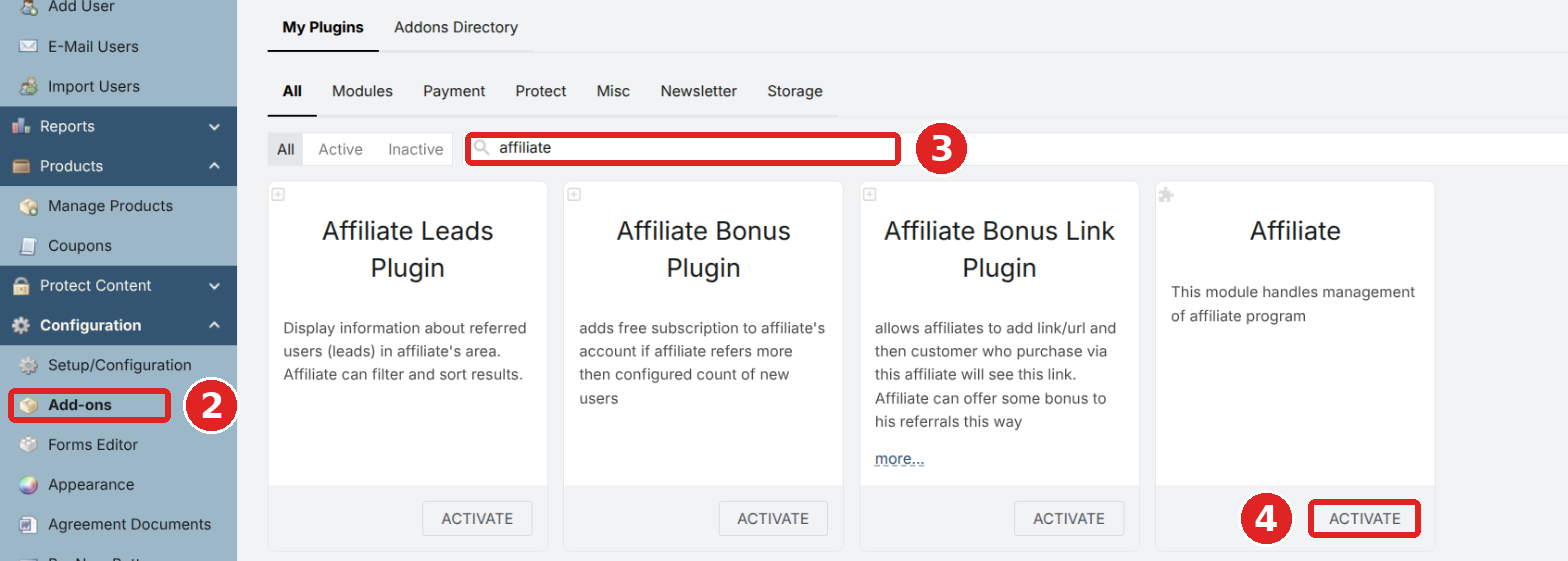
- Log in to aMember (
your-domain.com/members/admin). - Click Configuration → Add-ons.
- In the search box, type
affiliate. - On Affiliate, click Activate and confirm.
- Open its settings (Configuration → Setup/Configuration → Affiliates).
Set the commission
In the Affiliates settings you decide:
- How much affiliates earn: a percentage of each sale or a fixed amount. You can set a different commission for the first payment and for renewals.
- Who can become an affiliate: anyone, or only customers you approve.
- How long a referral counts: how many days after clicking a link a purchase still earns the affiliate a commission.
- How you pay them: for example by PayPal, and the minimum amount before you pay out.
For every option, see the aMember Affiliates guide.
Choosing a commission
Digital products have no production cost, so commissions of 30–50% are common. Check that your price minus the commission is still worth it for you.
How affiliates promote you
Affiliates sign up, then find their personal link and banners in their members area. They share the link, and aMember tracks the clicks and sales.
Pay your affiliates
aMember works out what each affiliate has earned. In the admin area, open the affiliate payouts report, pay each affiliate (for example through PayPal), and mark the payout as paid.
Your responsibility
You pay affiliates yourself. MemberShops doesn't handle affiliate payments, and takes no commission on your sales.