
What you need before installation
Before we can install your store you need four things: hosting, a domain, an aMember Pro license and a PayPal or Stripe account. Here's what to look for and what each costs.
| What | Roughly costs | Required? |
|---|---|---|
| Web hosting, at least 10 GB | about $5 a month | Yes |
| A domain (your store's address) | about $12 a year | Yes, unless your hosting includes one |
| aMember Pro license | about $149, one-time | Yes |
| PayPal, Stripe or another payment account | No set cost; each charges its own fees | Yes, to take payments |
For the Complete Store with only the required items, the first year comes to about $1,218 ($997 for the store, plus the aMember license, a year of hosting and a domain). From the second year it's about $72 a year for hosting and the domain. Optional upgrades are extra.
Tested providers
These work well with MemberShops stores: Hetzner, Hostinger and Namecheap for hosting, and Dynadot for domains. You can use another provider if it meets the requirements below.
1. Hosting
Hosting is the computer your website runs on. You rent it by the month.
What to look for:
- Standard shared hosting is enough. You don't need a VPS, a dedicated server or "managed WordPress" hosting. The product files are kept on the MemberShops cloud, not on your hosting.
- At least 10 GB of storage.
- A hosting panel (for example cPanel) that you can log in to. We use it to install your store.
- Free SSL (the padlock, https). Most hosts include it.
How to buy it:
- Go to the website of the hosting company you've chosen (Hetzner, Hostinger or Namecheap).
- Choose a shared or web hosting plan with at least 10 GB of storage. Paying for a year at a time is usually cheaper than paying monthly.
- If the plan offers a free domain, you can claim it during checkout and skip step 2 below.
- Complete the purchase. The hosting company emails you the address of your hosting panel and your login. Keep that email: you'll send these details to us.
Don't install anything yourself
Many hosting companies offer to "install WordPress" during sign-up. You can skip that. We install WordPress, Divi, aMember and everything else for you.
2. A domain
Your domain is your store's address, for example myplrstore.com.
Tips for choosing one:
- Short, easy to spell and easy to say out loud
- A
.comif you can get one - Avoid hyphens and numbers
- Avoid other companies' brand names
How to buy it:
- Go to Dynadot (or your hosting company, if it sells domains).
- Search for the name you want and buy it. A year usually costs about $12 a year.
If you bought the domain and the hosting from different companies, the domain has to be pointed at your hosting:
- In your hosting account, find your nameservers. They usually look like
ns1.yourhost.comandns2.yourhost.com. The welcome email often lists them too. - Log in to your domain account (for example at Dynadot), open your domain's settings and find Nameservers (sometimes called DNS settings).
- Replace the existing nameservers with the ones from your host and save.
It can take a few hours, and occasionally up to a day or two, before the domain starts working with your hosting. If you're not sure how to do this, tell us when you send your details and we'll check it during installation.
3. aMember Pro license
aMember Pro runs your customer accounts and payments. It's a separate product, bought once from aMember.
- Go to the aMember website and buy aMember Pro (about $149, one-time).
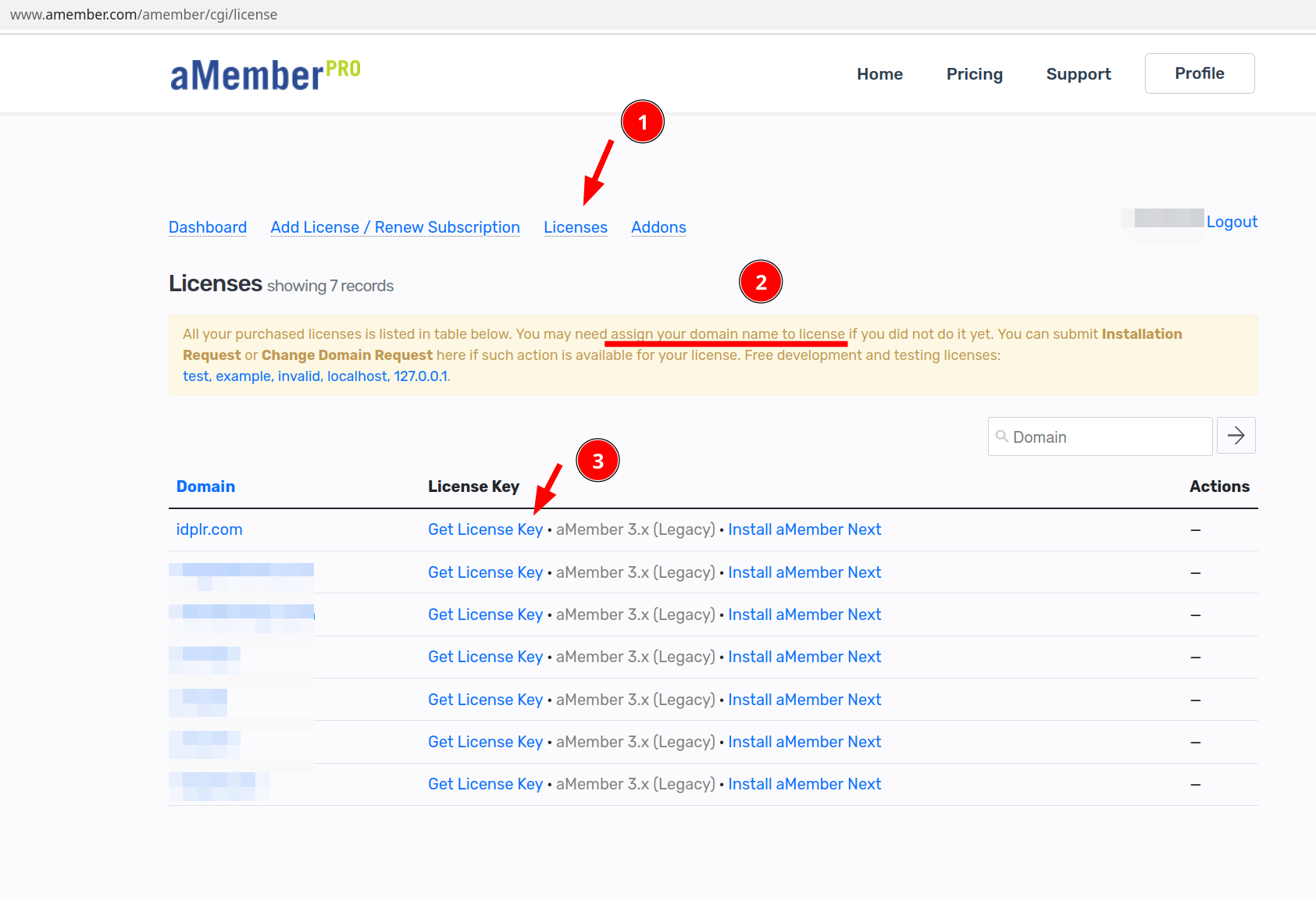
- Log in to your account on amember.com and click Licenses in the top menu.
- Assign your domain to the license first. Use the "assign your domain name to license" link in the yellow box and enter your store's domain (for example
myplrstore.com, withouthttps://orwww). aMember only gives you a key once a domain is assigned. - Next to your domain, click Get License Key and copy the key. Keep it: you'll send it to us.
Use the right domain
The license only works on the domain you assign to it. Assign the exact domain your store will use. If you need to change it later, aMember offers a "Change Domain Request" on the same page.
4. A payment account
To take payments you need an account with a payment processor. Most store owners use PayPal, Stripe or both. aMember also supports 2Checkout, ClickBank and many others.
- If you don't have one yet, open a business account with PayPal or Stripe. It can take a few days for them to verify your details, so start early.
- You don't need to connect it before installation. You'll connect it yourself afterwards: see Connect PayPal and Connect Stripe.
Ready?
When you have your hosting panel login and your aMember Pro license key, go to How installation works.