
Add or remove a customer's credits
Add credits to a customer's balance as a gift or refund, or take credits away.
Customers use credits to buy single products. See Credits and credit packs. You can change a customer's balance yourself, for example to give a bonus, to say sorry for a problem, or to undo a mistake.
Open their credits
- In aMember (
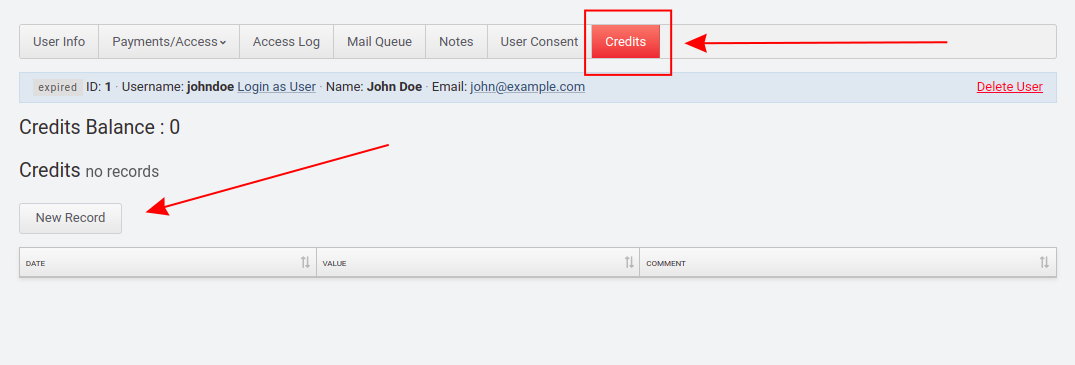
your-domain.com/members/admin), go to Users → Browse Users and click the edit icon next to the customer. See Find and edit a customer. - Click the Credits tab at the top.
You'll see their Credits Balance and a list of every change to it.
Add credits
- Click New Record.
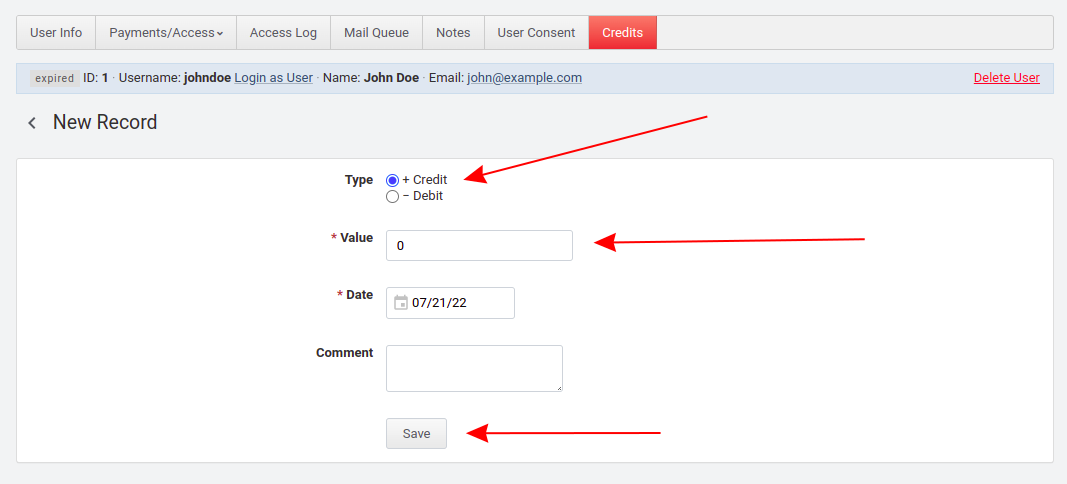
- Type: choose +Credit.
- Value: how many credits to add.
- Comment: a note for yourself, for example "Gift for feedback".
- Click Save.
Take credits away
Do the same, but choose +Debit as the type. The value is taken from their balance.
Check it worked
The Credits Balance at the top of the tab shows the new total.