
Help desk
Give your customers a simple way to ask for help. aMember's Help Desk lets them send support tickets that you answer from your admin area. It's free, and switched off until you turn it on.
The Help Desk is an aMember plugin that comes free with your store. Customers open a ticket from their account, and you reply in aMember. Every conversation stays in one place, instead of scattered across your inbox.
It's switched off when your store is installed. Turn it on when you're ready to answer tickets.
Turn it on
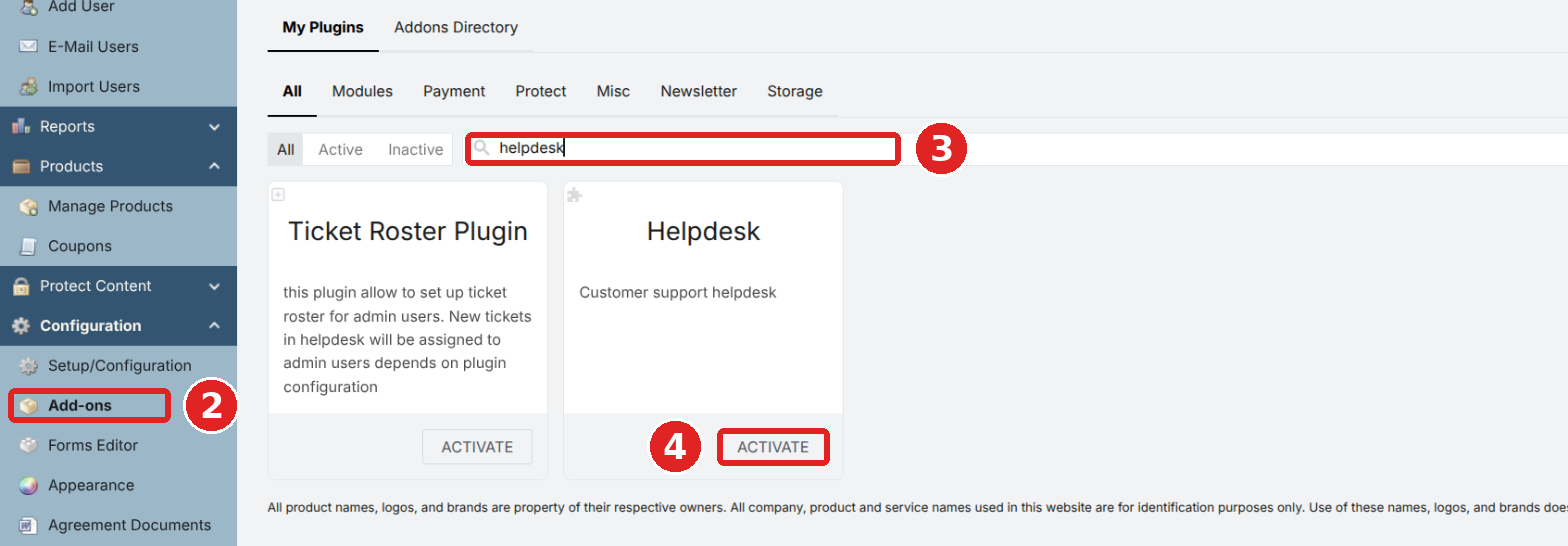
- Log in to aMember (
your-domain.com/members/admin). - Click Configuration → Add-ons.
- In the search box, type
helpdesk. - On Helpdesk, click Activate and confirm.
- Open its settings (Configuration → Setup/Configuration → Helpdesk) and check them. The defaults suit most stores.
- Click Save.
For every option, see the aMember Help Desk guide.
How customers open a ticket
Once it's on, the help desk is at your-domain.com/members/helpdesk. Customers can also find it in their members area (your-domain.com/members/member). They write their question, and you get a notification.
Customers must be logged in to send a ticket. That's on purpose: when you answer, you see everything about them in one place, such as their plans, payments and earlier tickets.
Add a link to it
Some store designs already have a "send a ticket" button in the footer; others don't. If yours doesn't, add a button or a "Support" link to your-domain.com/members/helpdesk in your footer or menu. See Change the header and footer and Edit your menus.
Messages from visitors who aren't registered
The help desk only takes tickets from registered customers. If you'd like visitors to reach you too, put your email address on your store, or add a contact form to a page (Divi has a Contact Form module). See Edit your homepage and other pages.
Answer tickets
In aMember, open Helpdesk in the left menu. You'll see open tickets first. Click one to read it and reply. The customer gets your reply by email and in their members area.
Good habits
- Reply within a day or two, even if only to say you're looking into it.
- Write a short FAQ page for the questions you get most often. Fewer tickets for you, faster answers for them.